
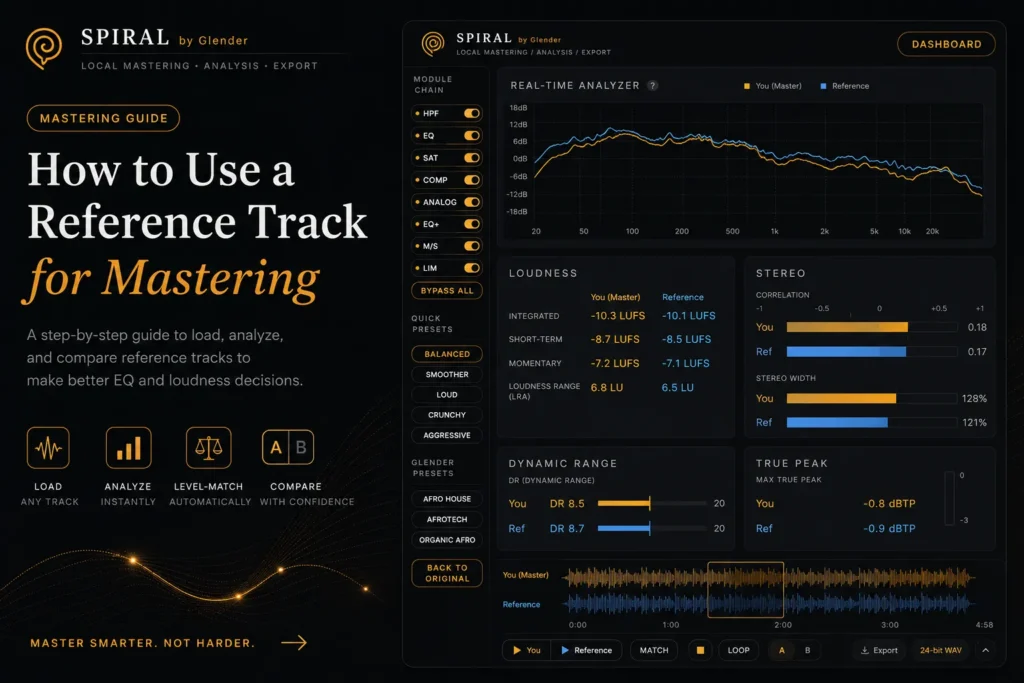
How to Use a Reference Track for Mastering (Step-by-Step)
A reference track is your most powerful mastering tool. Learn how to load, analyze, and compare reference tracks to make better EQ and loudness decisions.
How to Use a Reference Track for Mastering: The Complete Step-by-Step Guide
A reference track is the single most underused tool in mastering. Most producers know they should use one — but few know how. They load a random track, compare at different volumes, and draw the wrong conclusions. This guide will change that.
What a reference track is: A professionally mastered song in your genre, chosen specifically to benchmark your master against. It answers the most important mastering question: “How does my track compare to the best in my genre?”
Why You Cannot Trust Your Ears Without a Reference
Your auditory system adapts. After 10 minutes of listening to a dull master, it starts to sound normal. After 10 minutes of a bright master, it starts to sound balanced. This is called auditory adaptation, and it is the reason you make bad decisions in long mastering sessions. A reference track resets your perception. It is an external anchor — an objective point of comparison when your ears can no longer be trusted.
How to Choose the Right Reference Track
Choosing the wrong reference is worse than using none at all. Here are the criteria:
- Same genre and subgenre. Comparing an Afro House track to a Tech House reference will mislead you on low-end balance, loudness, and dynamics. Genre matters at the subgenre level.
- Similar arrangement. If your track has a sparse intro and dense drop, choose a reference with similar dynamic structure. Comparing tracks with different arrangements produces misleading LUFS readings.
- High-quality source. Use lossless files: WAV, FLAC, or AIFF. Never use YouTube rips, SoundCloud streams, or MP3s below 320 kbps. Compression artifacts will corrupt your analysis.
- Trust your ears AND the meters. A reference you love sonically is good. A reference with clean LUFS, spectrum, and dynamics readings is better. Ideally, both.
- Use 2-3 references. One reference gives you a single data point. Two or three show you a range — where your genre lives sonically.
How to Use a Reference Track in SPIRAL
- Load your mix. Start mastering with your full chain: HPF, EQ, saturation, compression, M/S, limiting.
- Load your reference. SPIRAL accepts WAV, MP3, FLAC, AAC, OGG, and M4A for reference tracks.
- Analyze both. SPIRAL automatically analyzes your master AND your reference: integrated LUFS, short-term LUFS, frequency spectrum, stereo correlation, and true peak — all side by side.
- Level-match. This is critical. SPIRAL automatically adjusts the reference volume to match your master’s perceived loudness. Without level matching, louder always sounds better — and you will make the wrong decisions.
- A/B by section. Loop the drop of your track, then switch to the drop of the reference. Compare: low-end weight, midrange clarity, high-end air, stereo width.
- Adjust and re-compare. Make small changes — 0.5 dB of EQ here, 1 dB less compression there — and A/B again. The goal is not to copy the reference. It is to understand where your master stands and make intentional decisions.
Common Reference Track Mistakes
- Copying instead of learning. Do not try to match the reference exactly. Every track is different. Use it as a perspective guide, not a template.
- Comparing at different volumes. Louder ALWAYS sounds better. If you are not level-matching, you are not comparing — you are being fooled.
- Wrong genre reference. A -5 LUFS Drum & Bass track is useless as a reference for a -14 LUFS Deep House track.
- Ignoring arrangement. If the reference has a sparse intro and your track is dense throughout, integrated LUFS comparison is misleading. Compare section by section.